Honeydew: Recipe Manager
- 4.8
- Rating
- 100.00K
- Installs
- Free
- Price

 Analysis by App-foxy
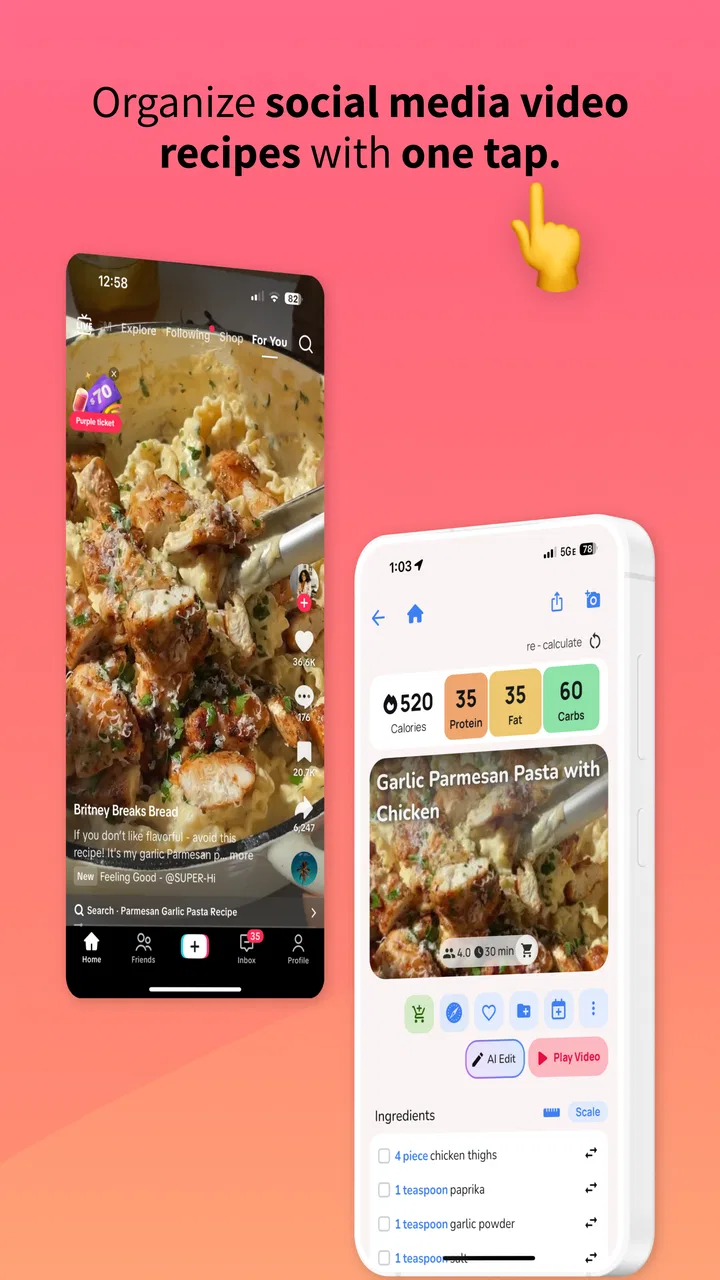
I usually decide whether a meal-planning app deserves a place on my phone within the first week. The test is simple: can it turn the recipes I already want to cook into a practical plan, or does it create another list I will forget? Honeydew: Recipe Manager takes a clear route by focusing on recipes discovered through online cooking videos and organizing them around the week ahead. That makes it more interesting than a basic recipe folder, although it also means its usefulness depends on how much you enjoy building meals from video inspiration.
After spending time with it as a food and drink app, I see the appeal. The interface is aimed at reducing the small decisions that make cooking feel tiring: what to make, which recipes belong together, and what needs to be remembered before shopping. It is free to start, rated for Everyone, and developed by Red Honey. Its store summary presents the idea as a relaxed way to turn viral recipe videos into a weekly meal plan, but the practical question is whether that promise survives a busy week. In my experience, it does best when I treat it as a planning workspace rather than as a replacement for a full cookbook.
How the basic Honeydew workflow feels in daily use
The natural starting point is a recipe video that catches my attention. Instead of leaving it buried in a social feed or saving it among dozens of unrelated clips, I use Honeydew as the place where that idea can become part of a meal plan. The value is not just collecting recipes. It is moving from “that looks good” to “I know when I might cook it.” That change sounds small, but it is the difference between browsing food content and actually using it.
You May Also Like

 AccuWeather: Weather Radar
AccuWeather Review: A Quick, Clear Forecast for Everyday Decisions
For everyday plans, the best forecast is the one you can understand quickly. AccuWeather makes rain timing, radar, and local conditions easy to act on, with a few trade-offs.

 Hill Climb Racing
Why Hill Climb Racing Still Turns Crashes Into One More Run
A tiny car, a bumpy hill and one more upgrade: Hill Climb Racing keeps resurfacing because its simple chaos makes every near-miss feel personal.

 AliExpress - Shopping App
AliExpress Makes Global Shopping Feel Personal, but Shoppers Bear the Risk
AliExpress turns a global marketplace into a pocket-sized discovery engine. Its reach is useful, its shopping loop compelling, and its trade-offs easy to miss.

 Lords Mobile: Kingdom Wars
Lords Mobile Is a Kingdom-Building Routine, Not a Quick Match
A case-by-case verdict on the building, battles, device demands, and social commitments that make Lords Mobile rewarding for some players and exhausting for others.

 PDF Scanner app - TapScanner
TapScanner Makes Paperwork Easier to Capture, Check, and Share
TapScanner makes scanning with a phone feel less like a rescue operation and more like a dependable step in getting work done. Its capture tools are useful, though not flawless.

 Block Blast!
 Shows How Much a Puzzle Game Can Leave Out
A quiet grid game shows why puzzle players increasingly value instant clarity, repeatable skill and low-pressure play—and where the genre still needs to catch up.
More From Our News Desk
View All News


I found it helpful to begin with a short list rather than trying to organize every recipe immediately. When I add too many possibilities at once, planning becomes another form of scrolling. A better routine is to choose a few meals that match the coming week, then leave the rest for later. This keeps the weekly view useful and gives each selected recipe a realistic place in my schedule.
A typical weekday example shows where the app earns its keep. On Sunday evening, I might select one quick dinner for a late workday, one recipe that produces leftovers, and one more ambitious meal for the weekend. Honeydew gives those choices a home in the weekly plan, so I am not deciding from scratch at six o’clock. I still need to check ingredients and judge the cooking time myself, but the mental load is lower because the decision has already been made.
That distinction matters. This is not an app that magically knows whether I have an onion, whether my oven is free, or whether I will be too tired to cook. Its strength is turning inspiration into an intentional sequence. I still bring the household knowledge; Honeydew helps me keep it from disappearing into bookmarks, screenshots, or a crowded notes app.
The first useful habit is to separate “interesting” from “ready to cook.” I keep tempting recipes in the broader collection until I have checked the ingredients, effort, and timing. Only then do I put them into the week. That two-stage approach prevents the meal plan from becoming a wish list. It is one of the simplest ways to make the app feel calmer and more dependable.
What to check before trusting a recipe to your week
Video recipes often look faster and easier than they are. A short clip may skip preparation, resting, marinating, or cleanup. Before assigning a recipe to a busy evening, I look beyond the finished dish and ask what the video leaves out. If the answer includes several pans, a long wait, or ingredients I would need to buy specially, I move it to a day with more breathing room.
I also avoid planning several recipes that compete for the same kitchen resources. Two meals requiring the oven at the same time are not a good pair, even if each one looks manageable alone. Honeydew can help me remember the plan, but it cannot replace this kind of practical judgment. The more honestly I estimate effort, the more useful the weekly arrangement becomes.
For people cooking for more than one person, another good habit is to label the role a meal will play in the week mentally: immediate dinner, leftover source, packed lunch, or weekend project. The app becomes more valuable when every saved recipe has a purpose. Without that step, the collection can still feel like a prettier version of a social-media save folder.
Settings and setup choices worth checking early
My first recommendation is to spend a few minutes exploring the available setup and planning controls before filling the app with recipes. Even when an app looks simple, the way I organize meals affects how quickly I can use it later. I prefer a structure that reflects real life: meals I will cook soon, ideas for later, and recipes that need a special shopping trip.
The most important setting-related decision is not a flashy option. It is deciding how much information I want to maintain. If I try to record every detail for every recipe, the system becomes work. If I keep only the information needed to choose and cook, it stays lightweight. Honeydew suits users who want a visual, approachable planning habit, not those who enjoy building a highly technical food database.
I would also check notification behavior and privacy-related prompts during setup, then keep only the reminders that support an actual routine. A reminder that arrives before my usual planning time can be useful; repeated alerts that I ignore will quickly become background noise. I prefer to make the app serve a fixed weekly habit instead of allowing notifications to dictate when I think about food.
Device compatibility is straightforward for many Android users because the app requires Android 7.0 or newer. The current release is version 1.7.9, so I would update before judging the experience, especially if an older installation feels inconsistent. On a phone with limited storage or an older operating system, checking compatibility before planning a large recipe collection is sensible.
Honeydew is free to download, but it includes in-app purchases ranging from $0.99 to $199.99 per item. I would not treat the free entry point as a promise that every possible tool is included without cost. My advice is to use the basic workflow first and decide whether the app has become part of your routine before paying for anything. A purchase makes more sense when it removes a real limitation in your planning, not simply because a premium prompt appears.
The age rating of Everyone also fits the app’s general purpose. It is suitable as a household planning tool, but that does not mean every recipe found through video content will suit every person. I still check ingredients, dietary needs, allergies, and preparation advice myself. The rating describes the app’s audience, not the nutritional or medical suitability of each dish.
A setup that keeps the plan realistic
I get better results when I begin with the week’s constraints. I consider how many evenings I can actually cook, which day needs something fast, and whether I want leftovers. Then I choose recipes. Starting with recipes and trying to force them into the calendar usually creates an overambitious plan.
For a shared household, I would agree on the broad meal choices before building the final week. Honeydew can hold the plan, but it cannot resolve disagreements about spice, budget, or preparation time. A quick conversation outside the app saves more friction than endlessly rearranging recipes inside it.
Another useful setup choice is to leave space. I rarely fill every meal slot with a new recipe. One flexible night for leftovers, takeout, or an improvised meal makes the rest of the plan more resilient. This is especially important with video-inspired cooking, where the actual effort may be greater than the clip suggests.
Faster patterns for people who use it every week
Once the basic workflow is familiar, speed comes from repeatable decisions rather than from rushing through the interface. I use a short planning session, choose meals by difficulty, and avoid reopening the entire recipe collection every night. The goal is to reduce choices at the moment when I am hungry and tired.
One pattern I recommend is pairing a dependable meal with an experimental one. The dependable recipe protects the week if the new dish takes longer or does not suit my taste. This is more practical than filling the plan with viral recipes simply because they look exciting. Honeydew is particularly good at holding that balance between discovery and routine when I deliberately create it.
A second pattern is ingredient overlap. If two planned recipes use similar fresh ingredients, I can shop once and reduce waste. I do not force overlap when it makes the meals repetitive, but I look for sensible connections such as herbs, greens, or a common base. The app helps me see the recipes together; the saving comes from making the shopping decision with both meals in mind.
A third pattern is planning by energy rather than by day of the week. I assign the most involved recipe to the evening when I have time, not automatically to a particular weekday. If my schedule changes, I move the demanding meal instead of abandoning the whole plan. That flexibility is important because a rigid calendar can make a helpful app feel like another obligation.
I also recommend a “decision deadline.” I choose the coming meals before shopping, then stop browsing. Endless recipe discovery is enjoyable, but it can undermine the purpose of planning. Honeydew works best when I close the discovery loop and commit to a manageable set of dishes.
How I handle leftovers and repeat cooking
Leftovers are where a weekly planner can become genuinely practical. I choose one meal that is likely to hold up well, then place it before the busiest part of the week. I do not assume every video recipe will reheat well; crisp textures, delicate sauces, and certain fried foods may be better eaten immediately. That is a limitation of the recipes themselves, but the planner makes it easier to account for it.
Repeating a successful recipe is also underrated. A recipe manager should not become a contest to try something new every night. When a dish works for my household, keeping it in the rotation gives the app long-term value. I can use new videos for inspiration without sacrificing the reliable meals that make weeknight cooking manageable.
For beginners, I would start with two planned recipes and one flexible option. For experienced cooks, a larger plan may be comfortable, but I still suggest keeping at least one low-effort fallback. The right number depends on the household, and Honeydew does not remove that judgment. Its role is to make the chosen plan visible and easier to follow.
Where the app reaches its limits
Honeydew is not the best choice for every kind of food planning. If I need precise nutrition tracking, detailed macro calculations, medical diet management, or a carefully structured pantry inventory, I would look for a specialist tool. Its appeal is the bridge from recipe video to weekly organization, not comprehensive dietary analysis.
It is also less suitable for someone who already has a large, meticulously organized cookbook and prefers cooking from fixed recipes. In that case, a traditional recipe database or a notes system may be faster, especially if video discovery is not part of the person’s routine. Honeydew earns its place when the starting point is inspiration and the problem is turning that inspiration into action.
The video-first approach has another trade-off: the recipe may depend on information presented visually or verbally rather than in a carefully standardized format. I would not rely on a quick clip alone for unfamiliar techniques, allergy-sensitive cooking, or exact timing. I check the source carefully and use common sense before serving a dish to other people.
There is also a natural risk of over-collecting. Because the app is connected to the appeal of viral recipes, it can encourage me to save more than I will ever cook. The solution is not complicated, but it requires discipline: review the collection regularly, remove recipes that no longer interest me, and promote only realistic choices into the weekly plan.
In-app purchases deserve the same measured approach. The broad price range means the cost of optional items can vary considerably, so I would read each purchase screen carefully and avoid assuming that every paid option is necessary. For a casual user who plans occasionally, the free experience may be enough. For someone who uses the app as a central weekly system, a paid feature could be worthwhile only if its benefit is clear in daily use.
Performance and comfort also depend on the phone and the way someone cooks. A person who keeps their phone away from the kitchen may prefer a printed list or a dedicated smart display. Someone who already saves recipes in a browser and never revisits them may not change habits just by installing another app. Honeydew helps most when the phone is already part of the cooking routine.
Who should use it, and who should skip it
I would recommend it to people who discover meals through short cooking videos, feel overwhelmed by scattered saves, and want a gentle weekly structure. It is also a good fit for households that need a shared sense of what is coming next without turning meal planning into a spreadsheet.
I would be more cautious recommending it to users with strict medical diets, detailed nutritional targets, or a strong need for exact ingredient scaling. Those needs call for tools built around precision rather than inspiration. I would also skip it if I wanted a complete grocery-management system first and a recipe discovery tool second.
The app’s reception suggests that the concept has found an audience: it holds an average rating of 4.6 from around 13 thousand ratings and has passed 100 thousand installs. Those figures do not make it automatically right for me, but they do indicate that the simple recipe-to-plan idea is resonating with many users. I still think the best test is whether it reduces my own weekly indecision after several planning cycles.
My verdict after building a repeatable habit
What I like most about Honeydew is the change in emphasis. It does not ask me to become a professional meal planner. It gives recipe inspiration a next step. When I use a small collection, assign meals according to real energy levels, and leave room for leftovers, the app makes cooking feel more intentional without becoming overly formal.
Its weaknesses are closely tied to that simplicity. I need to verify recipe details, estimate effort, manage dietary concerns, and resist saving everything that looks appealing. Users wanting advanced nutrition tools, rigorous pantry control, or a complete cookbook may be happier elsewhere. Honeydew is not a universal kitchen command center, and expecting it to be one would lead to disappointment.
For me, the strongest workflow is consistent: collect selectively, check the recipe before scheduling it, build a week around actual commitments, and keep one flexible meal available. I then reuse successful recipes instead of treating every week as a new experiment. Those habits matter more than filling the app with a huge archive.
Red Honey has made an approachable food and drink app for a specific modern problem: good recipe ideas are everywhere, but they are not automatically organized into meals. With a free starting point, Everyone content rating, and support for Android 7.0 and newer, it is easy to try. The current version, 1.7.9, gives prospective users a clear baseline, while the optional purchases mean I would explore before spending.
My final recommendation is simple: try it if your recipe inspiration begins with videos and your real problem is deciding what to cook next. Give yourself a week or two to build a modest routine rather than judging it from a single saved recipe. Honeydew: Recipe Manager is at its best when it quietly turns scattered inspiration into a plan I can actually follow. It is not the right tool for every dietary or organizational need, but for relaxed, repeatable weekly planning, I found its focused approach genuinely useful.
FAQs for Honeydew: Recipe Manager
01What is Honeydew: Recipe Manager?
Honeydew: Recipe Manager is a versatile app designed to organize and streamline your cooking experience. It allows users to store, categorize, and access their favorite recipes easily. With features like meal planning, shopping list creation, and ingredient substitution suggestions, it aims to simplify meal preparation for both novice cooks and seasoned chefs.
02How does Honeydew help with meal planning?
Honeydew offers a comprehensive meal planning feature that lets users schedule meals for the week or month. You can select recipes and assign them to specific days, ensuring a balanced and varied diet. The app also generates a shopping list based on your meal plan, making grocery shopping efficient and hassle-free.
03Can I customize recipes in Honeydew?
Yes, Honeydew allows you to customize recipes to suit your preferences or dietary needs. You can modify ingredient quantities, add personal notes, or substitute ingredients. This feature is particularly useful for adapting recipes to accommodate food allergies or specific taste preferences.
04Is Honeydew available for both Android and iOS?
Honeydew: Recipe Manager is available for download on both Android and iOS platforms. This cross-platform availability ensures that you can access your recipes and meal plans from any device, whether it's your smartphone or tablet, making it a convenient tool for home cooks everywhere.
05Does Honeydew require an internet connection to function?
Honeydew can function offline for most of its features, such as viewing and editing saved recipes. However, an internet connection is required for certain functionalities like syncing data across devices or accessing online recipe databases. Offline access ensures that you can cook without interruptions even when not connected to Wi-Fi.
Pros
- User-friendly interface for easy navigation.
- Seamless recipe import from various websites.
- Customizable shopping list feature.
- Meal planning calendar integration.
- Offline access to saved recipes.
Cons
- Limited recipe categorization options.
- No option for nutritional information tracking.
- Occasional sync issues across devices.
- Lacks a built-in timer for cooking.
- Ads in free version can be intrusive.

Honeydew: Recipe Manager
Gallery